
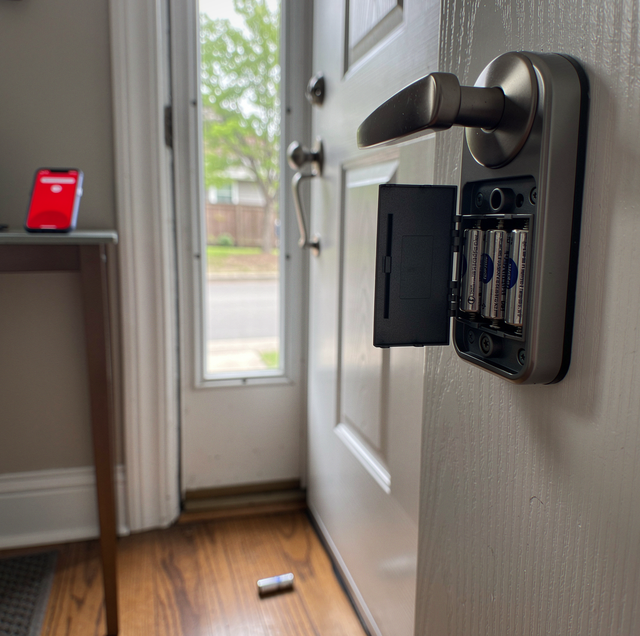
The app says the lock is offline. The batteries read full, the bolt throws by hand and by keypad, and the door works the way it did last week. Nothing is broken in the part you can touch, which is what makes the flag hard to act on: what it reports on is the link, and the link runs somewhere else.
First, settle which link you are troubleshooting; the app's device settings usually say.
Quick Answer: Most smart locks drop off for one of five reasons: the wrong radio for the distance, an obstruction inside the doorway, a hub sitting too far from the door, batteries too weak to transmit, or a network that changed underneath the lock.
What Kind of Radio Your Lock Uses
Three different arrangements get called connected, and they fail in different ways. A Bluetooth-only lock cannot be knocked offline by a router change because it never connected to the router. A Wi-Fi lock cannot be helped by moving a hub it does not own. A mesh lock keeps working through an internet outage but goes quiet the moment its hub loses power.
Bluetooth Low Energy is built for short hops between two nearby devices. It sips power, works during an internet outage, and needs no other hardware. What it cannot do is tell you anything when you are not standing there. If your lock is Bluetooth-only and the app says "not found" from the kitchen, that is the radio behaving exactly as designed, not a fault.
Wi-Fi gives the lock a real network address, so it can report in and take commands from anywhere. The cost is power. A Wi-Fi radio draws far more current than a mesh radio does, which is why many manufacturers keep the Wi-Fi part outside the lock in a plug-in bridge and let the lock itself run on something thriftier. It also means the lock inherits every quirk of your home network.
Mesh radios sit between the two. Z-Wave, Zigbee and Thread run at low power and cover a house by relaying messages in hops rather than shouting across it. They stay up when the internet is down. The trade is that they need a hub or bridge, and the lock's pairing lives with that hub, so the hub's location and health become yours.
None of this settles whether a smart lock belongs on your door. The question here is narrower: why the link goes quiet, and what a homeowner can actually change about it.
Distance and What the Signal Has to Pass Through
Radio at these power levels is stopped by two things: mass and metal. A solid-core or metal-clad door slab, a brick or block wall, a steel frame, plaster over metal lath, a large mirror, and foil-faced insulation all cut into the link. Foil facing is the quiet offender in many houses because a continuous conductive sheet within a wall behaves like a shield rather than an obstacle. The lock's radio usually sits in the interior battery housing, inches from a metal slab, aimed back into the house through whatever the builder put in the way.
Distance and obstruction stack. A hub across the house through one plaster wall may hold fine, while the same hub at the same distance through a masonry chimney chase will not. It is also why a lock can work for months and then start dropping after a remodel, a new steel storm door, or a metal shelving unit set against the wall the signal used to cross.
A dropped call in a concrete stairwell has the same shape. The handset still shows bars from its last exchange with the tower, and the gap only appears the moment it tries to send. A lock app does the same thing: the green dot you see is the status the lock last reported successfully, not proof the lock can be reached right now. That gap between the last good check-in and the next attempt is where most "it says connected, but it will not respond" complaints live.
Where the Hub or Bridge Needs to Sit
Hubs get installed where the internet arrives, which is almost always the worst place for them. A hub in the basement, in a wiring cabinet, behind a metal panel door, two floors below the front entry, is asking a low-power radio to cross a floor system, a stairwell, and probably some ductwork. The lock will pair during setup, because you are standing right there with the app, and then drop off once you close everything up.
Placement rules are unglamorous, and they work. Put the hub on the same floor as the door if you can, out in the open rather than inside a cabinet, off the floor rather than on it, and away from the microwave and the router's own antenna cluster. If the hub has to stay near the modem, the fix is usually a bridge or a second access point closer to the entry, not a different lock. Before rearranging anything permanently, move the hub to the hallway nearest the door on an extension cord for a full day; if the drops stop, you found a range limit.
Why Weak Batteries Show Up as a Connection Problem
Transmitting is the second-hungriest thing a smart lock does, behind driving the bolt motor. Alkaline cells hold their resting voltage well but sag significantly under load, then recover once the load is removed. The lock measures the battery at rest, sees a number it likes, and reports a healthy charge. Then it tries to transmit, the voltage dips below what the radio needs to complete the exchange, and the message never lands. From the app's side, that reads as offline, not as low battery, and it can read that way for weeks before any battery warning appears.
Several ordinary things push a lock into that zone earlier. Mixing old and new cells drags the whole pack down to the weakest one. Rechargeable cells sit at a lower nominal voltage than alkalines from the day you install them, so some locks never behave well on them. Cold also reduces the voltage a cell can deliver, which is why a cold door drops out more often. And a bolt fighting a misaligned strike makes the motor work harder on every cycle, pulling the pack down faster than normal use ever would.
Do not leave dead alkaline cells sitting in a lock for months. Discharged cells vent and leak, and the residue corrodes the battery contacts, turning a five-minute battery swap into a replacement of the whole interior escutcheon.
What Changed on Your Network
A lock that ran for a year and quit last Tuesday usually did not fail. Something upstream moved. The most common events, in the order they show up:
The router was replaced, or the provider swapped equipment: The lock is still trying to join a network that no longer exists.
The two bands were merged under one name: Nearly every smart lock and bridge is 2.4 GHz only. Modern routers often publish 2.4 GHz and 5 GHz under a single network name and decide which one to use for the client, a behavior usually labeled band steering. Steering works by withholding 2.4 GHz responses so a dual-band client picks 5 GHz, which suits phones and laptops. Two things go wrong for a lock: an access point that deprioritizes 2.4 GHz association leaves a single-band lock struggling to join, and a setup phone sitting on 5 GHz cannot discover the lock during pairing.
A firmware update stalled partway: An interrupted update can leave the radio half-configured, reachable enough to show in the app and not reachable enough to take a command. The lock usually needs to be removed from the app and re-added before it works.
The lock lost its address and never got a new one: After a long power outage or a router reboot, devices renegotiate their addresses in a rush. Slow, low-power clients sometimes lose that race and sit unaddressed until they are restarted. Do it in order: the router first, then the bridge or hub, then the lock by pulling a battery briefly.
Keeping Entry Working When the Radio Is Down
Radio problems should never become entry problems, and on most residential hardware they do not have to be. Most smart deadbolts are built over an ordinary mechanical cylinder, and retrofit models mount on the interior side of a deadbolt you already own, leaving the exterior keyway exactly as it was. The lock is designed so a cut key still turns it when the electronics are dark. Keep one, keep it current, and store it in a keyed lockbox, your car, or with a neighbor you trust.
For keypad models with no cylinder, manufacturers generally place contacts on the outside of the housing, where a 9-volt battery supplies enough power to enter your code and open the door. Find those contacts and read the procedure now, rather than in the rain with groceries.
Find out today whether your lock has a keyway or emergency power contacts. If it has neither, a flat battery shuts you out of your own house, and getting back in becomes a locksmith call rather than a battery swap.
Building a Setup That Stays Connected
Match the radio to the building first. On a heavy or metal-clad door in an older house with plaster walls, a mesh lock with the hub on the same floor holds up better than a Wi-Fi lock trying to reach a basement router. In an open-plan setup with the router upstairs, a Wi-Fi lock is fine and saves you from needing a hub.
Then take the cheap wins in order. Give the 2.4 GHz band its own network name so the lock has one place to go and stays there. Fix the strike alignment before you blame the electronics, because a bolt that drags will keep eating batteries no matter which radio you buy. Replace batteries on a schedule rather than on a warning, and use fresh cells of the same type across the whole pack. Run firmware updates on purpose at a time when you can watch them finish, rather than letting one start on a half-drained lock.
Last, treat the door itself as part of the system. Hardware fit, strike position, bolt throw, and frame condition all determine how hard the motor has to work, and how hard the motor works determines how long the radio has enough voltage to speak. A lock that is mechanically easy is a lock that stays online longer.
Frequently Asked Questions
On a Z-Wave or Zigbee network, it usually helps, but only certain devices count. Mains-powered gear on the same protocol, such as plug-in switches, smart plugs and wired sensors, repeats messages for the network; a Zigbee plug does nothing for a Z-Wave lock. Battery devices, including the lock itself, do not repeat, because listening constantly would drain them. Adding a matching plug-in device between the hub and the door adds a genuine relay point.
Remote access runs through the manufacturer's cloud service, which is a separate path from the local radio link. If the app can drive the lock while you are standing next to it but not from the office, suspect the account side: an expired login, a service outage, or a household member removed from the shared home. Signing out and back in often fixes it.
Not always. A Wi-Fi lock stores the network name and password internally, so if you configure the new router with the identical network name and password, the lock generally rejoins on its own without being removed from the app.
It can. The 2.4 GHz band is crowded and shared, and Zigbee channels overlap with the Wi-Fi channels most routers default to: 1, 6, and 11. In an apartment building or a tight row of houses, that overlap shows up as intermittent lag rather than a clean disconnect. Moving your router to a less occupied channel often steadies the lock.
This test needs a lock with its own Bluetooth radio, which many Z-Wave-only deadbolts lack. If yours has one, stand at the door, turn Wi-Fi off on your phone, and open the app so it falls back to a direct Bluetooth link. If the lock responds that way, the motor, the electronics, and the pairing are all healthy, and the fault is upstream in the network or hub. If it will not answer even at arm's length, the problem is at the lock.
A dedicated IoT network is fine, provided client isolation is switched off. Isolation blocks devices on that network from seeing each other, which prevents the phone or hub from discovering the lock during setup. Many locks also require the phone to be on the same network segment during pairing, so run setup on the main network first.
Sort out a smart lock that keeps dropping off — a technician can check the door, strike, and cylinder, confirm the hardware suits your slab and frame, and fit a lock that stays reachable. Lock Star Locksmith serves Pittsburgh, Bethel Park, Penn Hills. Call (412) 376-6706.
